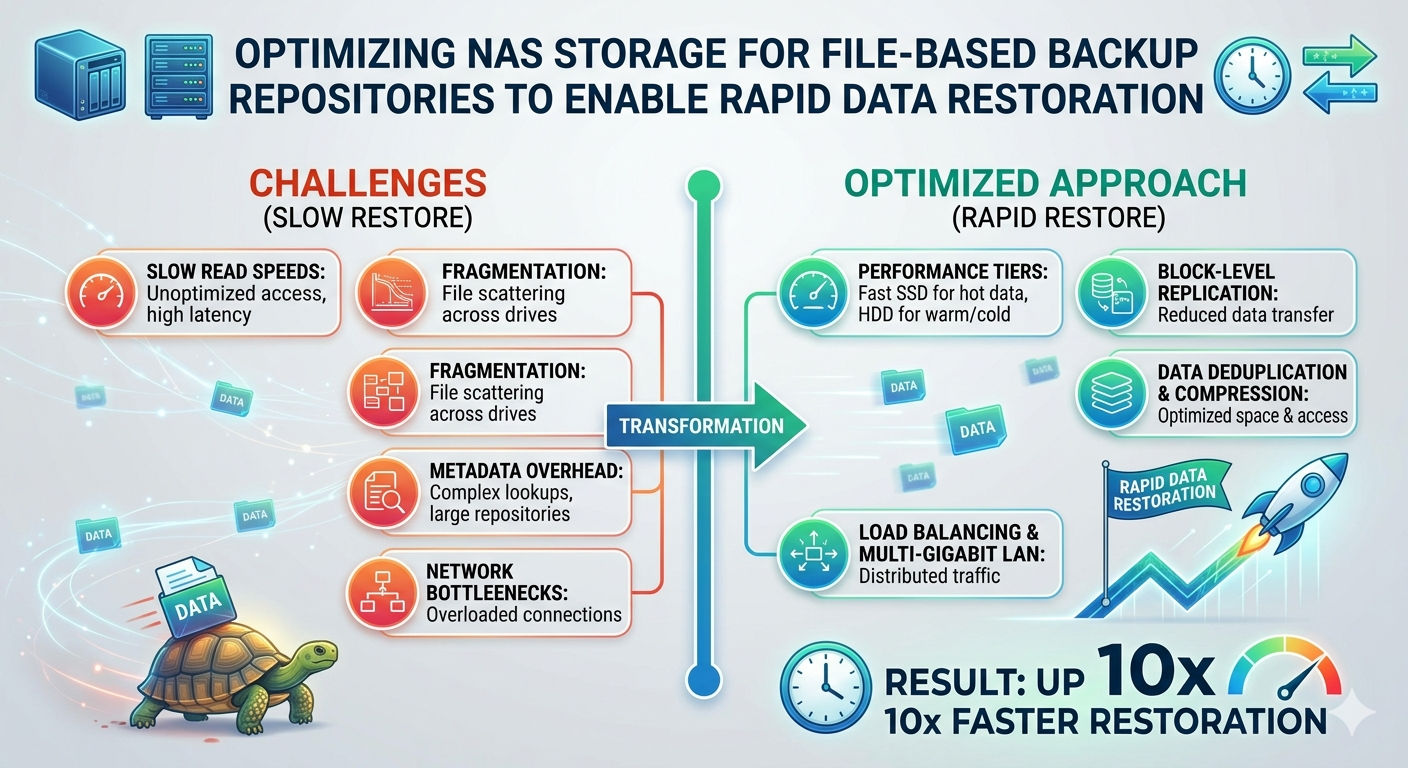
Data loss events require immediate, decisive action. When systems fail or ransomware encrypts critical files, the recovery time objective (RTO) dictates how quickly operations must resume. Administrators rely heavily on file-based backup repositories to restore this data. However, simply writing backups to a network-attached device does not guarantee fast read speeds during a critical recovery phase.
Storage administrators must architect their infrastructure specifically for restoration speed, not just archival capacity. By default, many storage systems prioritize space efficiency over throughput. This configuration creates severe bottlenecks during a massive data pull. To meet aggressive RTOs, technical teams must optimize the underlying hardware, network configuration, and file system protocols.
A properly configured NAS Backup Repository transforms a standard storage target into a high-performance recovery engine. This requires a systematic approach to network bandwidth, disk input/output operations per second (IOPS), and protocol tuning. By optimizing these specific components, organizations can significantly reduce their recovery times and mitigate the financial impact of unexpected downtime.
The Architecture of Enterprise NAS
Understanding the underlying architecture of Enterprise NAS is critical for maximizing performance. Unlike block-level storage systems (such as SAN), NAS operates at the file level. This means the storage controller handles the file system and manages access through protocols like Network File System (NFS) or Server Message Block (SMB).
The storage controller acts as the brain of the NAS storage system. It processes incoming and outgoing network traffic, manages data placement on the physical disks, and executes storage efficiency features. If the controller lacks sufficient CPU or RAM, it becomes a choke point during large-scale restorations. Organizations must provision controllers with adequate processing power to handle the simultaneous read requests generated during a full system recovery.
Furthermore, the physical storage media dictates the absolute limits of your read and write speeds. While traditional hard disk drives (HDDs) offer high capacity at a lower cost, their mechanical nature introduces latency. Enterprise environments often utilize a tiered storage approach. This involves combining high-capacity HDDs with solid-state drives (SSDs) to balance capacity with necessary speed.
Configuring Your NAS Backup Repository for Speed
Achieving rapid data restoration requires aligning several technical configurations. Administrators must optimize the network pathways, select the appropriate RAID levels, and configure caching mechanisms.
Network Pathway Optimization
The network connection between the backup server and the NAS Storage device is a common bottleneck. A standard 1 Gigabit Ethernet (GbE) connection maxes out at approximately 125 megabytes per second. This is vastly insufficient for rapid enterprise recovery.
Upgrading to 10GbE, 25GbE, or even 40GbE network interfaces is mandatory for high-performance repositories. Additionally, administrators should implement Link Aggregation Control Protocol (LACP). LACP combines multiple physical network links into a single logical connection. This provides increased bandwidth and fault tolerance. If one cable fails, the traffic automatically reroutes through the remaining connections without interrupting the restoration process.
It is also critical to isolate backup traffic from standard production network traffic in an enterprise NAS environment. Implementing dedicated Virtual Local Area Networks (VLANs) prevents standard user activity from degrading restoration speeds. Jumbo frames (MTU 9000) should be enabled across the entire backup network path to reduce packet overhead and increase payload efficiency.
Storage Media and RAID Selection
The choice of Redundant Array of Independent Disks (RAID) directly impacts read performance. RAID 6 is highly popular for backup repositories due to its dual-parity protection, allowing for two simultaneous drive failures. However, calculating parity introduces a performance penalty.
For environments where RTO is the absolute highest priority, RAID 10 (a stripe of mirrors) offers superior read and write performance. RAID 10 does not require parity calculations, allowing the controller to pull data directly from the disks at maximum speed. The trade-off is a 50% reduction in raw storage capacity.
Implementing SSD caching is an effective compromise. By allocating a pool of high-speed SSDs to act as a read cache, the NAS controller can temporarily stage frequently accessed backup blocks. During a restoration, the system retrieves data from the ultra-fast flash memory rather than the slower mechanical disks.
File-Based Backup Deduplication and Compression
Modern backup software heavily utilizes deduplication and compression to reduce storage footprints. While these technologies save significant amounts of disk space, they introduce a computing overhead during the restoration process. The data must be rehydrated—uncompressed and reassembled—before it can be written back to the production environment.
When optimizing a NAS Backup Repository, administrators must evaluate where this rehydration occurs. If the NAS storage array performs inline deduplication, the NAS controller bears the computational load. If the controller is underpowered, restoration speeds will plummet.
Alternatively, if the backup server handles the deduplication (source-side deduplication), the NAS simply serves the compressed blocks. The backup server then requires substantial CPU resources to rehydrate the data. To ensure rapid restoration, organizations must monitor CPU utilization on both the NAS controller and the backup server to identify and eliminate rehydration bottlenecks.
Frequently Asked Questions
What is the best network protocol for a NAS Backup Repository?
For a NAS backup repository, Windows-based environments should use SMB 3.0 or higher due to its multichannel capabilities, which allow the aggregation of network bandwidth. For Linux or UNIX environments, NFS v4.1 offers excellent performance and multipathing support.
How does latency impact file-based restoration?
Latency measures the delay between a data request and the resulting data transfer. In file-based storage, high latency significantly degrades throughput, especially when restoring millions of small files. Utilizing SSD caching and ensuring network paths are free of congestion are the best methods for reducing latency.
Should I use inline or post-process deduplication on my Enterprise NAS?
Inline deduplication processes data as it is written to the disks, which can slow down backup ingest speeds but saves space immediately. Post-process deduplication writes the data in its raw format first, then deduplicates it later. For pure restoration speed, turning off NAS-level deduplication entirely yields the fastest read times, though it requires vastly more raw storage capacity.
Securing Your Recovery Point Objectives
Building a resilient infrastructure requires more than just allocating terabytes of disk space. It demands a systematic configuration of network protocols, storage media, and compute resources. By understanding the mechanical limitations of storage arrays and the computational demands of data rehydration, administrators can eliminate bottlenecks.
Optimizing your storage environment ensures that when a critical failure occurs, the data is not only safe but immediately accessible. Review your current network bandwidth, evaluate your RAID configurations, and test your restoration speeds regularly. Continuous testing is the only definitive way to prove your infrastructure can meet the demands of rapid data recovery.