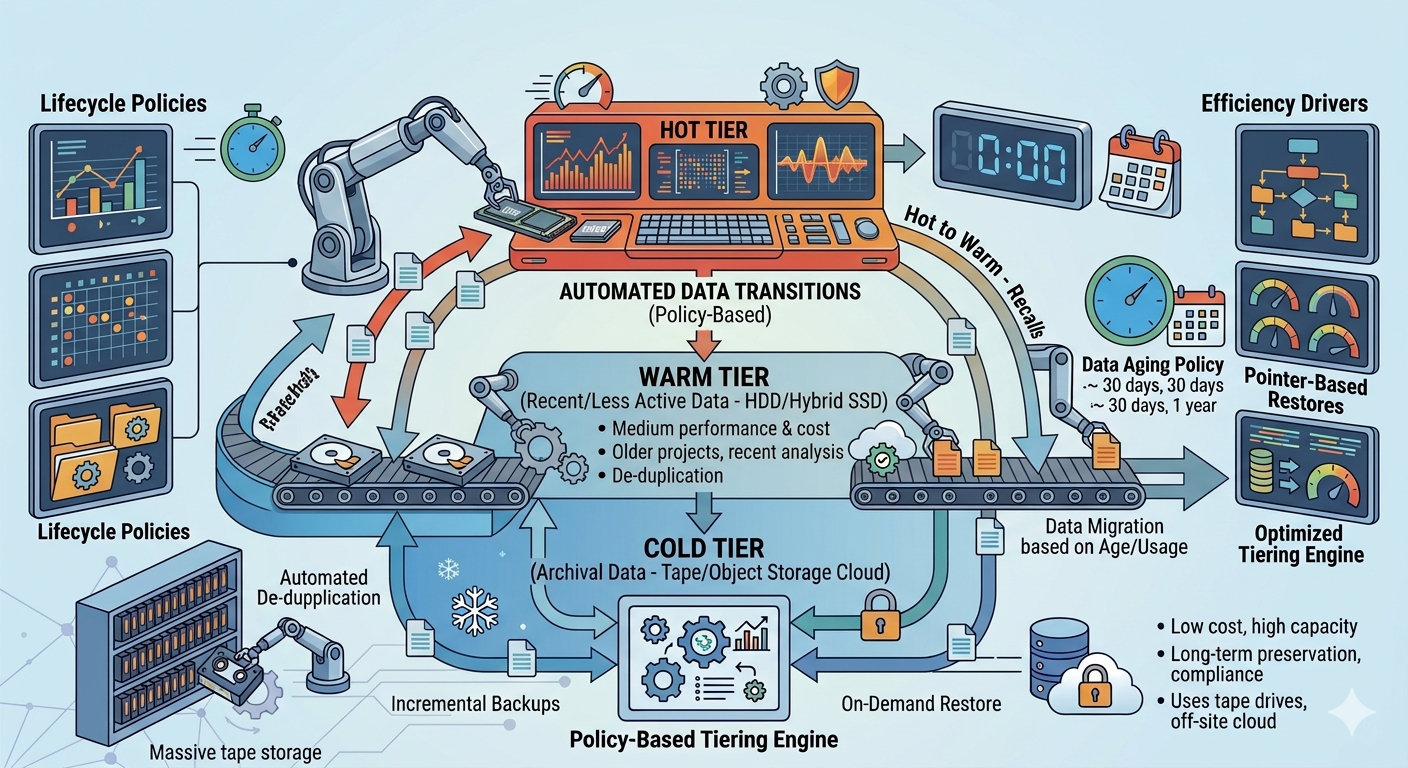
Enterprise organizations face continuous exponential data growth. Storing all digital assets on premium, high-performance media is financially impractical and technically inefficient. Data lifecycle management provides a strategic approach to this hardware limitation, allowing administrators to align the physical cost of storage with the actual value and access frequency of the information.
Modern IT environments frequently rely on a specialized NAS system to execute this automated tiering. These network-attached architectures evaluate file metadata, access patterns, and utilization metrics to move assets seamlessly between different storage mediums. The primary objective is minimizing latency for mission-critical workloads while utilizing cost-effective, high-capacity drives for aging or inactive files.
Understanding how NAS storage solutions transition data between hot, warm, and cold tiers allows network administrators to optimize their hardware investments. The technical mechanisms behind automated lifecycle management rely on rigorous policy-driven architectures to maintain optimal performance without requiring manual intervention.
Understanding Data Classification in a NAS System
To implement an effective lifecycle strategy, a NAS system must first classify data based on its operational relevance. This classification dictates the physical media on which the data resides at any given moment.
Hot Data: High-Performance Requirements
Hot data consists of files that users and applications access, modify, and process continuously. Examples include active databases, virtual machine images, and live collaborative documents. Because latency directly impacts business operations, NAS storage solutions allocate hot data to the highest-performing hardware. This tier typically utilizes Non-Volatile Memory Express (NVMe) drives or enterprise-grade Solid State Drives (SSDs). These storage mediums deliver the high Input/Output Operations Per Second (IOPS) necessary to support concurrent user access and intensive application workloads.
Warm Data: The Middle Ground
As files age or projects conclude, access frequency drops significantly. The data is still relevant and may be required for occasional reference, reporting, or auditing, but it no longer requires sub-millisecond latency. This is warm data. To balance cost and performance, a NAS system moves warm data from expensive flash storage to standard Serial Attached SCSI (SAS) drives or performance-oriented Hard Disk Drives (HDDs). This tier provides a high capacity-to-cost ratio while maintaining acceptable retrieval times for intermittent access.
Cold Data: Archival and Compliance
Cold data encompasses information that organizations must retain for regulatory compliance, historical records, or legal holds, but rarely access. This includes completed project archives, old employee records, and long-term backups. Storing this information on active server drives consumes valuable resources. Therefore, NAS storage solutions transition cold data to high-capacity, low-speed SATA HDDs, tape libraries, or integrated public cloud storage buckets. The retrieval time for cold data can range from seconds to hours, which is an acceptable trade-off for the massive reduction in storage costs.
The Mechanics of Lifecycle Transitions
The movement of files across these three tiers does not happen manually. Enterprise NAS storage solutions utilize sophisticated software algorithms to monitor and execute these transitions automatically.
Policy-Based Management
Administrators configure specific policies within the NAS operating system to dictate how and when data moves. These policies evaluate file metadata parameters, including the date of creation, the last accessed date, and the last modified date. For example, a common policy might instruct the system to move any file that has not been accessed in 30 days from the hot tier to the warm tier. Another policy might dictate that files untouched for 180 days migrate directly to the cold tier.
Automated Storage Tiering
Once policies are established, the NAS software continuously scans the file system. When a file meets the criteria for demotion, the system migrates the data blocks to the appropriate lower-cost hardware during scheduled maintenance windows or off-peak hours. This prevents the migration process from consuming network bandwidth during peak operational times.
Conversely, if a user requests a file currently residing in the cold or warm tier, the NAS system can automatically promote that data back to the hot tier. This dynamic promotion ensures that if an older project is suddenly revived, the team has immediate, high-speed access to the necessary files.
Stub Files and Transparent Access
A critical feature of advanced NAS storage solutions is the ability to maintain transparent user access regardless of where the data physically resides. When a file moves to a cold tier or external cloud archive, the NAS system often leaves a "stub file" or symbolic link in its original location. To the end-user, the file appears exactly where they saved it. When the user clicks the file, the system intercepts the request, retrieves the data from the underlying tier, and delivers it to the user. This logical abstraction prevents workflow disruption and eliminates the need for users to hunt across different network drives for archived information.
Frequently Asked Questions
What triggers the migration of data between tiers?
Migration is triggered by user-defined policies within the storage management software. These policies evaluate metadata such as the last access time, file age, file type, or ownership. When a file breaches the threshold defined in the policy, the system schedules it for migration to the appropriate tier.
Can a NAS system integrate with public cloud storage for cold data?
Yes, modern NAS system architectures frequently feature native cloud integration capabilities. Administrators can configure the cold tier to utilize cloud object storage (such as Amazon S3 or Microsoft Azure Blob Storage). The NAS appliance manages the encryption and transfer of the data to the cloud, treating the external bucket as a logical extension of its own physical storage.
Architecting a Scalable Storage Strategy
Implementing automated data lifecycle management transforms an inefficient, monolithic storage pool into a highly optimized, cost-effective architecture. By systematically identifying access patterns and moving files across hot, warm, and cold tiers, organizations maximize the return on investment for their high-performance flash media while securely archiving vast amounts of historical data.
Evaluate your current network storage infrastructure to determine the ratio of active to inactive data. By deploying modern NAS storage solutions capable of granular policy enforcement, IT departments can regain control over data sprawl, reduce capital expenditure on hardware, and ensure that critical applications always have the resources they require.